This is default featured slide 1 title

Go to Blogger edit html and find these sentences.Now replace these sentences with your own descriptions.

This is default featured slide 2 title

Go to Blogger edit html and find these sentences.Now replace these sentences with your own descriptions.

This is default featured slide 3 title

Go to Blogger edit html and find these sentences.Now replace these sentences with your own descriptions.

This is default featured slide 4 title

Go to Blogger edit html and find these sentences.Now replace these sentences with your own descriptions.

This is default featured slide 5 title

Go to Blogger edit html and find these sentences.Now replace these sentences with your own descriptions.

Showing posts with label Photoshop_Tutorials. Show all posts

How to fix Pyidaungsu font error in Photoshop? Photoshop မှာ ပြည်ထောင်စုဖောင့် ရေးမရသူများအတွက် ပြင်ဆင်နည်း

p> In this post, we would like to share how to fix Pyidaungsu font error in Photoshop. There are some font errors typing Myanmar Text or Pyidaungsu fonts in Photoshop. In this case, we will use a font named Pyidaungsu-Book (Version: 1.8.3) for fixing font error. This font supports for all Photoshop version, CS5, CS6, CC 2014, 2015 to the latest version.

Pyidaungsu Fonts for Photoshop CS and Photoshop CC

File Name - Pyidaungsu-Book-1.8_Regular

File Type  - ttf

File Size   - 255 KB

Download - Pyidaungsu-Book-Regular

........................................................................................................................

File Name - Pyidaungsu-Book-1.8_Bold

File Type  - ttf

File Size   - 258 KB

Download - Pyidaungsu-Book-Bold

........................................................................................................................

File Name - Pyidaungsu-2.5.3_Numbers

File Type  - ttf

File Size   - 186 KB

Download - Pyidaungsu-Number

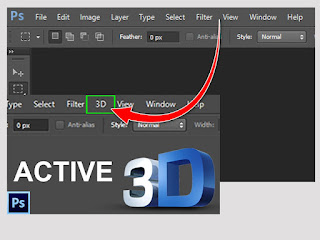
How to install and activate 3D for Adobe Photoshop CS6.

This post is shared for those who doesn't have 3D menu in Adobe Photoshop CS6. Some version of Adobe Photoshop CS6 didn't include 3D menu. This post instruct you how to activate 3D menu. Please see the instruction below. If you have any question, please leave the comment under the post.


>> How to download <<

WinRAR File Size (1.35 MB)
Downloand

MEGA link.....
https://mega.nz/file/spcW3bxY...


>> How to Install ထည့်သွင်းအသုံးပြုနည်း <<

1. After downloading the file.

2. Extract the file.

3. Click on the file and run as administrator

Credit to: https://www.facebook.com/စွန်ရဲ-သား-နည်းပညာ-2022930344670291/


How to preview your PSD file icon as a Thumbnail preview.

Today, we are going to share you about how to preview our PSD file icon as a Thumbnail preview in file explorer. In this case, we need to use a software which is called PSDCodec. Please see the following instruction for downloading and installation.

Note: Photoshop PSD file icon to Thumbnail Preview converter

>> Software Information <<

File Name - PSD Codec

File Type - Zip

File Size - 00.88 KB

Download - PSDCodec

>> Software Installation ထည့်သွင်းအသုံးပြုနည်း <<

1. Extract the downloaded Zip file.

2. Select the file and Run as administrator.
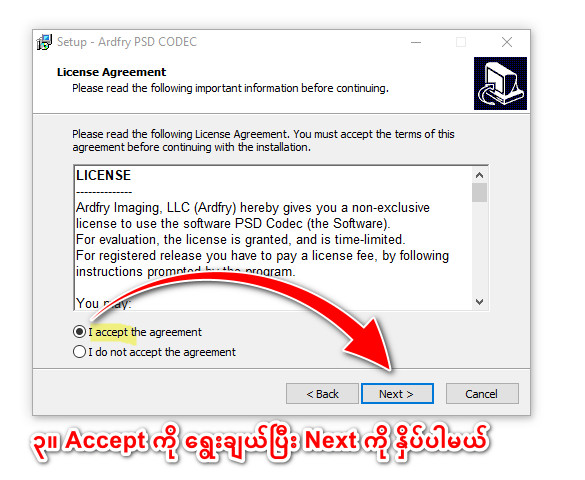
3. Select "I accept the agreement" and click Next to continue.
4. Click Next to continue and select "No, I will restart the computer later" if you don't wish to restart your computer yet. Than click Finish. 

DONE! THANK YOU!


>> ထည့်သွင်းအသုံးပြုနည်းကို Video အနေဖြင့်ကြည့်ရန် <<